Use your own domain
With two DNS records, players can join with play.yourname.com, no port needed.
What you need
- A domain you own, and access to its DNS settings (Cloudflare, Namecheap, GoDaddy and so on)
- Your server's IP and port from the panel's sidebar or Dashboard, for example
203.0.113.10:25570
1. Add an A record
Type:   A
Name:   play
Value:  203.0.113.10   (your server's IP)
On Cloudflare, set the proxy status to DNS only (grey cloud). Minecraft traffic can't go through Cloudflare's proxy.
2. Add an SRV record (so players don't need the port)
Type:      SRV
Name:      _minecraft._tcp.play
Priority:  0
Weight:    5
Port:      25570   (your server's port)
Target:    play.yourname.com
Some DNS providers ask for Service (_minecraft) and Protocol (_tcp) separately. Then the name is just play.
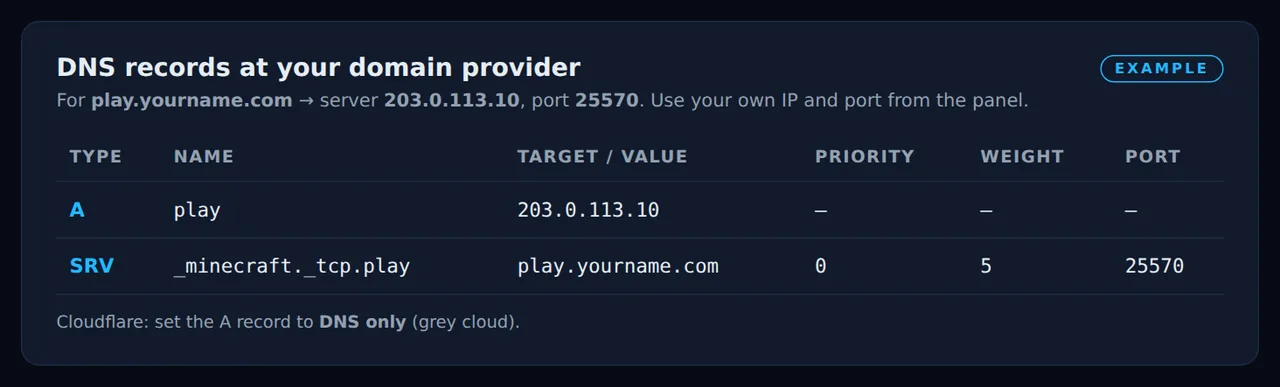
Addresses in these pictures are examples. Your own server's address is shown in your panel.
3. Wait and test
Changes usually work within a few minutes, sometimes up to a few hours. Then join with play.yourname.com.
Bedrock players
Bedrock Edition doesn't read SRV records. Bedrock players (through Geyser) enter play.yourname.com as the address and your port number in the port box.
Stuck?
Open a ticket in the client area and tell us what you've tried. We'll point you in the right direction.
Open a ticket